


Ready to Build Something Great?
Book a free strategy call with our team and let's turn your idea into reality.
Share This Blog
Enterprise Hybrid Cloud: A Practical Guide for US Businesses
An enterprise hybrid cloud connects a company’s own systems with public cloud services. It lets a business choose where its apps and data work best.
Think of a US store before Black Friday. Its warehouse software works well on local servers. Yet its website needs more power as shoppers arrive.
The store does not need to move every system. Instead, it can use cloud services for the website and keep its warehouse tools.
However, both sides must share correct data. Orders, stock counts, and shipping updates need to move without getting lost.
The examples below show possible setups. They explain the choices involved rather than describe specific client results.
What Does Enterprise Hybrid Cloud Connect?
A hybrid setup joins private systems with public cloud services. The private side may use company servers or a cloud reserved for one business.
The public side uses services from a provider. These can include storage, databases, and computing power.
“Public” does not mean your files are open to everyone. You still set rules for who can view or change them.
For example, a cloud website can send orders to a local stock system. That system then sends back the number of items left.
The value comes from this link. Without it, staff may still need to copy records by hand.
How One Online Order Moves Through the System
Good hybrid cloud architecture gives each task a clear path through an enterprise hybrid cloud.
Let’s follow a customer buying a jacket:
- The customer places an order on the website.
- The website sends it to the warehouse.
- The stock system reserves one jacket.
- The warehouse sends back an order update.
But what if the link breaks before the last step?
The website may send the order again. Without a check, staff could ship two jackets.
To prevent this, each order needs a unique code. The system uses that code to spot repeat requests.
A queue can also hold orders while the link is down. Once it returns, work can resume.
This is why hybrid cloud architecture must cover failed connections and repeated messages. Server locations are only part of the design.
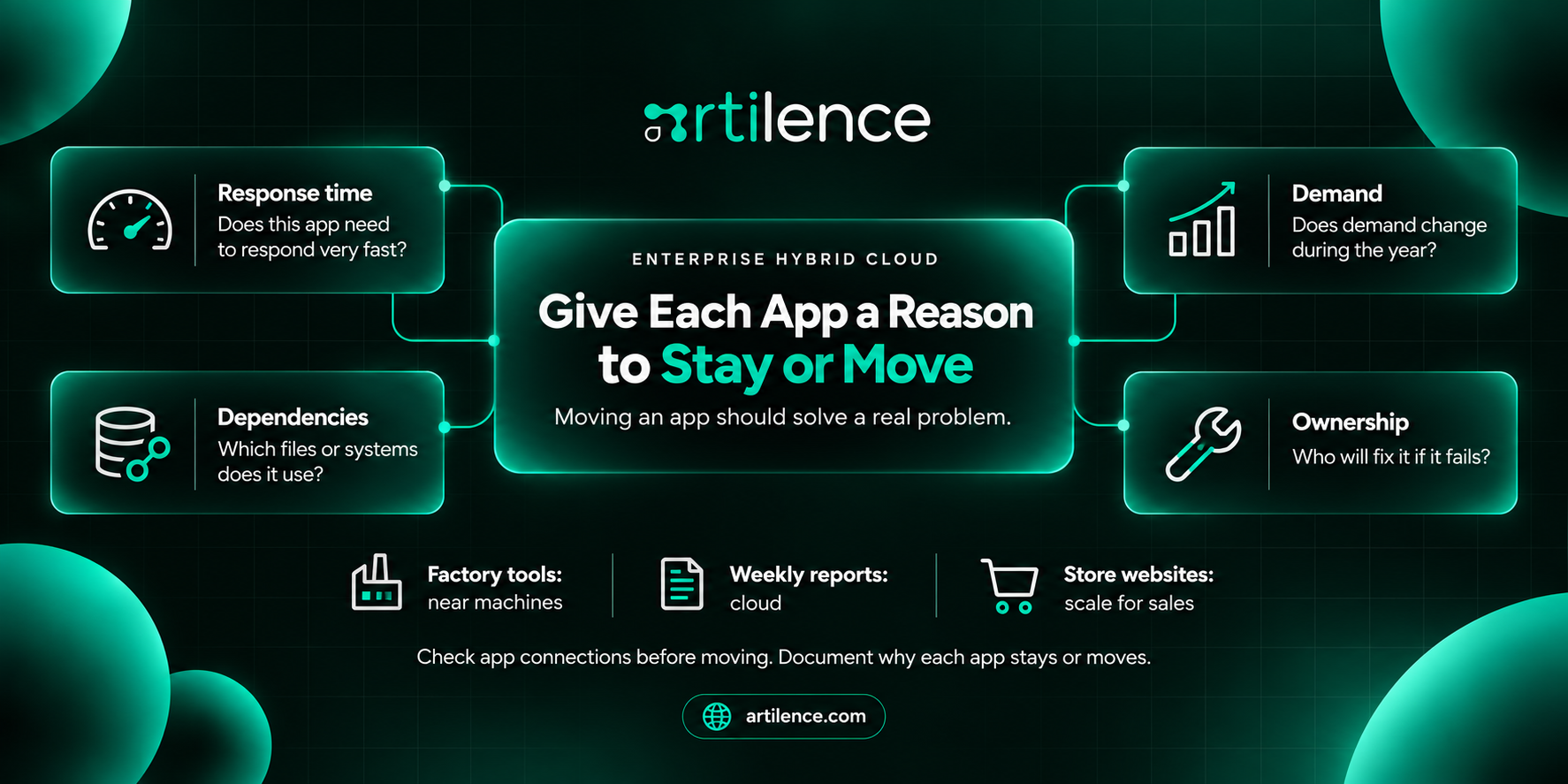
Give Each App a Reason to Stay or Move
An enterprise hybrid cloud works best when each app has a clear home. Moving an app should solve a real problem.
Start your hybrid cloud strategy with four questions:
- Does this app need to respond very fast?
- Which files or systems does it use?
- Does demand change during the year?
- Who will fix it if it fails?
For example, a factory tool may need servers close to its machines. A weekly sales report may run well in the cloud.
Meanwhile, a store website may need extra power during a sale. These tasks have different needs.
Check the links between apps before moving them. An app may slow down if its database stays far away.
Your hybrid cloud strategy should explain each choice. This helps future staff understand why the setup exists.
Where the Hybrid Model Helps Most
An enterprise hybrid cloud can help when older systems still do useful work. A business can keep them while adding cloud tools.
For instance, a parts maker may keep local production software. It could send daily totals to a cloud reporting tool.
Managers then get a shared view without replacing the whole factory system.
Another use is handling short bursts of demand. However, the app must support added cloud capacity. A cloud account alone cannot provide that behavior.
Hybrid systems can also support a gradual move. Teams can change one task at a time and test each step.
If your apps work well in one cloud, adding local systems may create needless work. Choose based on a clear business need.
Count More Than the Cloud Bill
An enterprise hybrid cloud is not always cheaper. You may still pay for local servers while adding cloud fees.
Therefore, compare the full cost of running the same task.
| Cost | What to include |
| Local servers | Power, repairs, space, and new parts |
| Cloud use | Storage, computing time, and idle resources |
| Data transfer | Fees for moving files between systems |
| Network | Main links, backup connections, and support |
| Software | Licenses, monitoring, and backup tools |
| Staff | Setup, training, updates, and repairs |
Next, work out costs for a normal month and a busy month. A yearly average may hide large peaks.
Also, track the cost of a useful result. For a store, this could be the cost per completed order.
Finally, remove resources that no one uses. Test servers can keep adding charges long after a test ends.
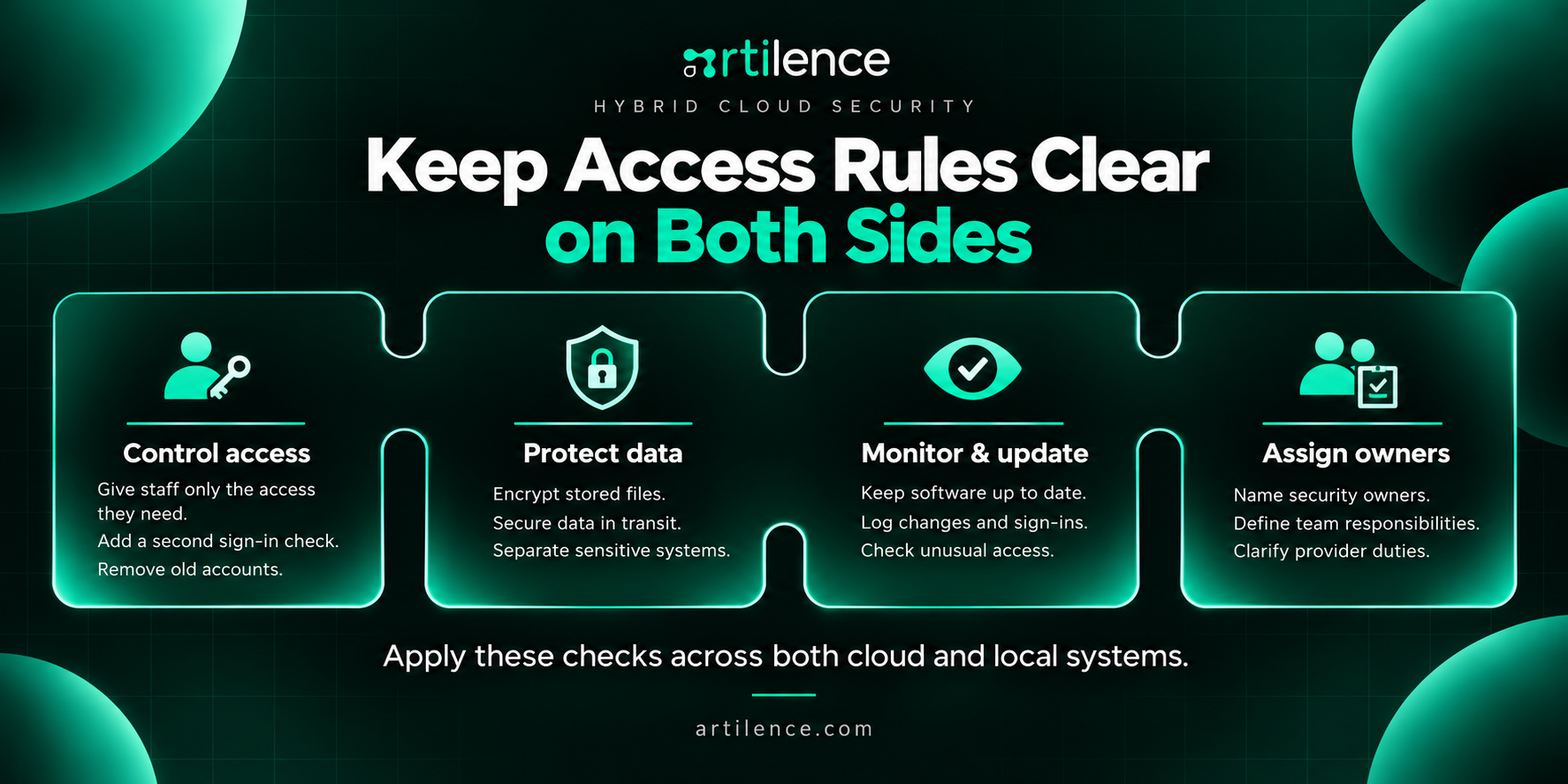
Keep Access Rules Clear on Both Sides
Strong hybrid cloud security starts with access. Staff should only open the files and tools needed for their work.
Add a second sign-in check, such as a code from an app. Then remove old accounts when people leave.
Other steps include:
- Encrypt files so people without the right key cannot read them.
- Protect data as it moves between systems.
- Keep software up to date.
- Record key changes and sign-ins.
- Check for unusual access.
- Keep sensitive systems apart from general tools.
An enterprise hybrid cloud needs these checks across both sides. A protected cloud account cannot fix an unsafe local server.
Hybrid cloud security also needs named owners. Write down which tasks your team handles and which belong to the provider.
Check Every Place Your Data Goes
For US firms, choosing a US cloud region is only one step. Also, check where your enterprise hybrid cloud stores backups, logs, and test files.
The main app may use one location. Its recovery copies may use another.
Ask where each copy goes and who can access it. Include outside tools that receive your data.
Next, test speed from real offices and branches. A fast link at the main office does not prove every branch will work well.
Support hours matter too. Teams across US time zones need to know who can help after normal office hours.
Keep these details in a short, shared record.
Make Daily Checks Easy to Act On
Good hybrid cloud management helps staff see what is running and what needs help.
A shared dashboard can show failed jobs, rising costs, and slow apps across your enterprise hybrid cloud.
However, each warning still needs an owner.
For every key app, record:
- Who owns it.
- Where it runs.
- Where its data lives.
- When backups take place.
- Who handles urgent faults.
- What it should cost each month.
Hybrid cloud management brings oversight across local and cloud systems. This helps teams spot problems that cross both environments.
Start with alerts that affect real work. Too many small warnings can hide a serious fault.
Test Before a Wider Rollout
Choose one small task for your first test. An internal report may be easier to manage than a live payment system.
Measure its speed, cost, and errors before making changes.
Then test the new setup. Break the connection on purpose in a safe test environment. Send a repeat record and restore a backup.
Set clear goals. For example, no accepted order should vanish during a brief outage.
Also, keep a way to return to the old setup. Expand only when results meet your goals and staff can support it.
How Artilence Can Help Connect Your Systems
Artilence offers backend development, cloud and database work, API integration, and DevOps services. These skills support connections between existing software and cloud tools. For an enterprise hybrid cloud project, start with one clear need, such as slow stock updates. Then agree on the data flow, access rules, tests, and support tasks. A focused scope makes the work easier to review. It also gives both teams a clear way to judge the result.
Frequently Asked Questions
1. What is enterprise hybrid cloud in simple terms?
It links a company’s private systems with public cloud services. Both sides share data or support connected tasks.
2. How is hybrid cloud different from multicloud?
Hybrid cloud links private or local systems with public cloud services. Multicloud means using more than one cloud provider. A business can use both models.
3. Is hybrid cloud secure?
It can be, with strong access rules, safe settings, and regular checks. Both local and cloud systems need protection.
4. What are the main benefits of hybrid cloud?
It lets firms keep useful systems while adding cloud tools. Teams can choose where each app runs based on its needs.
5. What are the main drawbacks?
There are more links, settings, and costs to manage. Faults can be harder to trace when they cross several systems.
6. Is hybrid cloud cheaper than public cloud?
Not always. Compare staff time, server costs, cloud fees, and network charges before choosing a model.
7. Do we need servers in our office?
No, a private cloud can run at another site. It still needs a planned connection with public cloud services.
8. Can older software work with cloud tools?
Often, yes, if it has a reliable way to share data. Some apps need changes before they can connect well.
9. What happens if the connection fails?
Tasks that need the link may pause. Local work may continue, while a queue can hold messages for later.
10. How should a company start?
List your apps, their data needs, and their main problems. Then test one small task before making wider changes.
11. What is a hybrid cloud and an example?
It connects private systems with public cloud services. A store might run its website in the cloud and keep connected warehouse software locally.
12. What is an enterprise cloud?
It is a cloud setup built for an organization’s apps, data, and staff. It may use a public, private, or hybrid model.
13. Is AWS a hybrid cloud?
AWS is a public cloud provider that also supports hybrid setups. Connecting company systems with AWS services can create a hybrid environment.
14. What is a primary benefit of a hybrid cloud model for enterprise IT?
A key benefit is the choice of where apps and data run. Firms can keep suitable systems while adding cloud capacity as needs change.
Artilence Newsletter
Don't worry your email is secure with us, We will use it to share the latest updates straight to your inbox!
By subscribing, you agree to our Privacy Policy.
Ready to Build Something Great?
Book a free strategy call with our team and let's turn your idea into reality.
Related Insights



AI is our language, we speak it fluently. Let's innovate together.




Services
Artilence Newsletter
Don't worry your email is secure with us, We will use to share latest updates straight to your inbox!
By subscribing, you agree to our Privacy Policy.


